Responsible by Design: How ILS Matches AI to the Work

Kim Glenn - Managing Director, Innovative Learning Solutions ·

How we put the right AI tool on the right problem, keep people at the center, and stay true to the values you already know us for.

AI is everywhere right now, and most of the conversation swings between breathless excitement and quiet worry. In EDSI’s Innovative Learning Solutions (ILS) team, we land somewhere more useful. AI is a tool. A good one, when it's used well. And like any tool we pick up, it has to earn its place by making our work better for our customers, not just faster for us.

If you've worked with EDSI, you already know what we care about. We show up, we smile, and we support. Those three values shape everything we do, and they shape how we use AI too. Showing up means a real person owns the work and stands behind it. Smiling means we wonder and work together to develop solutions to delight our customers. Supporting means we build for every learner and stay in your corner as a partner, not just a vendor.


We match AI to the problem in front of us instead of chasing whatever is new this week. If a tool doesn't solve a real problem, it doesn't make it into a project. And we're always happy to tell customers exactly how we use it, because they deserve to know what goes into the courses, videos, and programs we build.

How We Pick the Right Tool for the Job

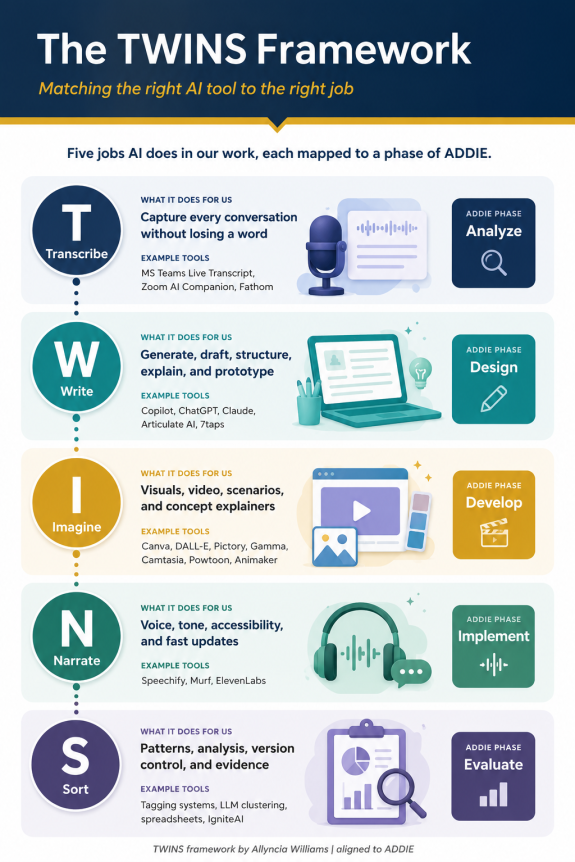
So how do we decide which tool fits where? We lean on the TWINS framework, created by instructional design leader Allyncia Williams. We like it because it sorts AI tools by the job they actually do, not by the logo on the box: Transcribe, Write, Imagine, Narrate, and Sort. Even better, each one lines up neatly with a phase of ADDIE, the design model that has guided our work for years.

TWINS Step

The Job it Does For Us

ADDIE Phase it Serves

Transcribe

Capture conversations without losing anything

Analyze

Write

Generate, draft, structure, explain, prototype

Design

Imagine

Visuals, video, scenarios, storytelling, explainers

Develop

Narrate

Voice, tone, accessibility, update speed

Implement

Sort

Patterns, analysis, version control, evidence

Evaluate

Here's the short version. Transcribe strengthens our analysis, Write speeds up design, Imagine brings development to life, Narrate carries us through rollout, and Sort tells us whether it all worked. So, when we reach for an AI tool, we're reaching for a specific job, at a specific moment, for a reason we can explain to you.

Responsible by Design

A framework tells us where a tool fits. Our values and our standards tell us how we are allowed to use AI tools. We built these guardrails around the Equity and Ethics and Customer Impact parts of our ANCHOR Framework (a framework that supports AI implementation), and honestly, they are just our values correlated with AI.

  • A human always shows up. A qualified instructional designer reviews, corrects, and signs off on every piece of AI-assisted work. The model doesn't get the last word. We do, and we stand behind it.
  • We check, we don't assume. AI can sound completely confident and still be wrong, so we check what it gives us against real sources and real experts before anything reaches our customers.
  • Accessibility isn't optional. Every AI-generated image, caption, and bit of narration gets reviewed against accessibility standards, because supporting learners means supporting all of them.
  • Customer information stays protected. We're careful about what goes into any AI tool, and we follow our customer’s data requirements and each platform's compliance standards.
  • We keep equity in view. We watch for bias in the language and images AI produces, because the people you serve are real people, not a statistical average.
     
TWIINS framework
TWINS in Our Everyday Work

Transcribe, where we show up and listen. Good design starts with getting the problem right, and that starts with really listening. Tools like Microsoft Teams Live Transcript, Zoom AI Companion, and Fathom help us capture discovery sessions, expert interviews, and stakeholder conversations so nothing slips away. That means our analysis rests on what was actually said, not on a fuzzy memory of the meeting. We double-check names, terms, and commitments against the source, and we treat those recordings carefully, with your privacy and everyone's consent front of mind.

Write, to reach a strong first draft faster. Once we understand the problem, AI helps us get from blank page to working draft. We use tools like Copilot, ChatGPT, and Claude, plus the built-in AI Assistant in Articulate Storyline and Rise and the AI features in 7taps, to draft outlines, objectives, scenarios, and storyboards. But a draft is just a draft. Our designers bring the learning science, shape the flow, and make sure every assessment is measuring the right outcome before it goes anywhere.

Imagine, where we generate learning worth smiling about. Great learning needs more than walls of text. For visuals and video we turn to Canva, image generators like DALL-E, and tools such as Pictory, Gamma, Camtasia, Powtoon, and Animaker to build diagrams, explainer videos, and scenario-based stories. AI handles a lot of the heavy lifting in production. We make the creative and instructional calls, check everything for accessibility, and keep the look and tone consistent and genuinely engaging, because nobody learns much from something they can't stand to sit through.

Narrate, a clear voice and quick updates. When a course goes live, the voice and tone matter, and so does being able to update fast when things change. Voice tools like Speechify, Murf, and ElevenLabs let us add clear narration, support learners who need or prefer audio, and adjust a script without re-recording the whole module. We're thoughtful here. We're upfront when narration is AI-generated, and we would never imitate a real person's voice without their okay.

Sort, to prove it worked and keep getting better. Finally, we need to know whether the learning actually landed. Tagging systems, AI-assisted clustering, and good, well-built spreadsheets help us spot patterns in feedback and assessment data, make sense of open-ended responses, and keep clean version histories. Inside Canvas, where our KeyweLearn catalog lives, Instructure's IgniteAI tools help with grading and surface the data we use to measure impact. What we learn points us to the next improvement, which is really just us supporting our customers for the long haul.

What AI Doesn't Do at EDSI

AI doesn't replace our instructional designers. It doesn't get to decide what's true. It doesn't set the strategy, sit with stakeholders, or understand learners the way someone who has been in the room with them can. That's the human part of the work, and it's the part we care about most. It's where aim to show up, smile and support so well. 

AI allows us to move faster on the routine, mechanical work so we can spend more time on what really matters, and our customers get learning that's accurate, accessible, and genuinely worth people's time.

Interested in learning more about our innovative learning solutions? Fill out the form below, and we’d be happy to listen to your needs and wonders.